


Golfbays
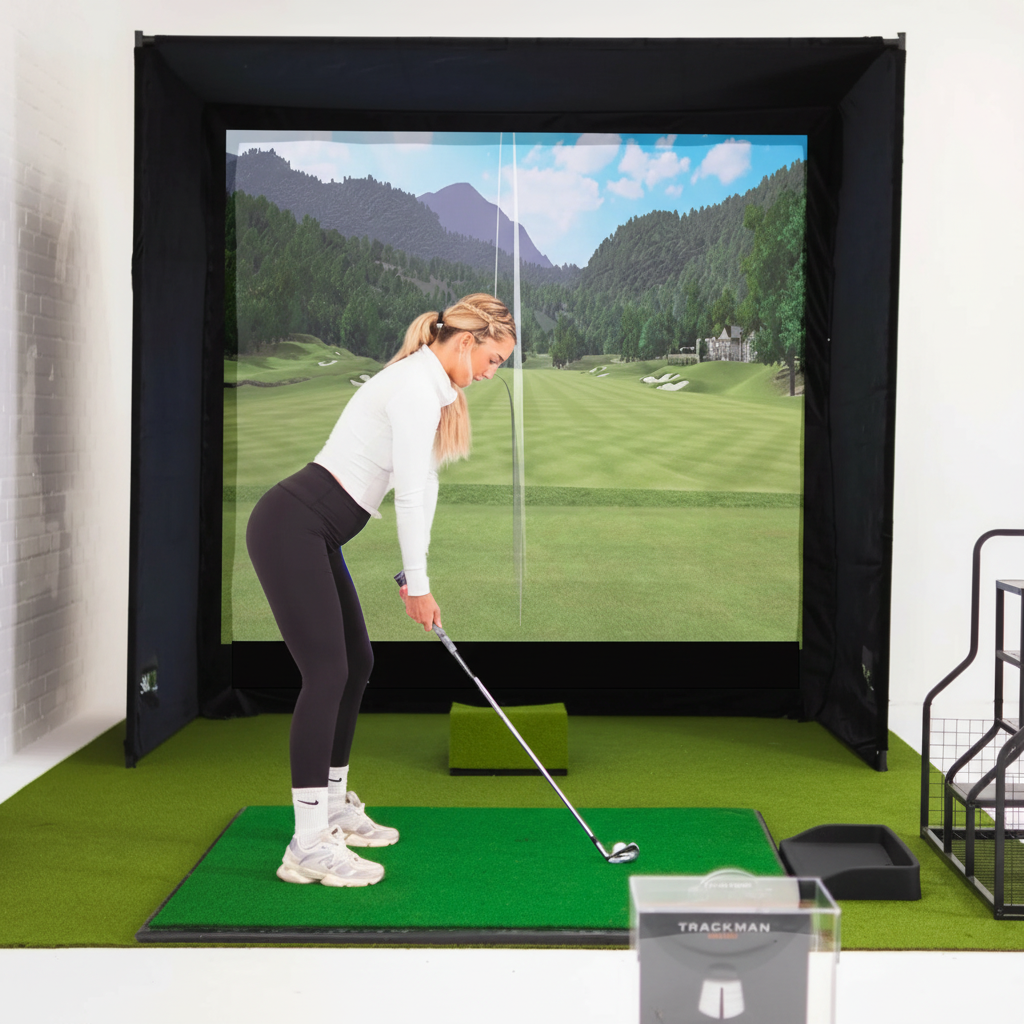
GolfBays SimBox Golf Simulator Enclosure with PRO+ Impact Screen & Side Barriers
GolfBays SimBox Golf Simulator Enclosure with PRO+ Impact Screen & Side Barriers
Couldn't load pickup availability
Share


Product Description
Create a dedicated indoor golf practice space with the GolfBays SimBox Golf Simulator Enclosure. Available in seven size options, this enclosure includes a frame, PRO+ Premium Impact Screen, and side barriers for a customizable home golf simulator setup.
The PRO+ Premium Impact Screen is designed to receive golf ball impacts while providing a projection surface for compatible golf simulator equipment. When paired with a separately purchased projector and golf simulation system, the screen can display virtual golf courses and practice visuals.
The enclosure frame supports the impact screen and provides a defined hitting area for indoor practice. Included side barriers offer additional containment for off-center shots.
Designed for golfers of different experience levels, the SimBox can be used for practicing drives, approach shots, and other golf techniques in a suitable indoor space.
The kit includes assembly components and installation instructions to support setup. Its seven available sizes provide options for different room dimensions and golf practice configurations.
Features
-
Seven Size Options: Available in seven configurations to accommodate different indoor golf practice spaces.
-
PRO+ Premium Impact Screen: Included screen is designed for golf ball impacts and projected simulator visuals.
-
Projection-Compatible Surface: Supports visuals from compatible, separately purchased golf simulator equipment.
-
Enclosure Frame Included: Provides structural support for the impact screen.
-
Side Barriers Included: Additional barriers help contain off-center golf shots.
-
Indoor Golf Practice: Suitable for home golf simulator installations with adequate clearance.
-
Versatile Training Setup: Supports practice activities involving drives, approach shots, and other golf techniques.
-
Assembly Components Included: Comes with the components required for enclosure installation.
-
Installation Instructions: Includes setup guidance for assembling the enclosure.
-
9-Month Screen Warranty: PRO+ impact screen includes a nine-month warranty.
Specifications
|
Specification |
Details |
|---|---|
|
Brand |
GolfBays |
|
Product Name |
SimBox Golf Simulator Enclosure |
|
Product Type |
Indoor Golf Simulator Hitting Enclosure |
|
Available Sizes |
7 Options |
|
Product Weight |
35,500 g (35.5 kg) |
|
Impact Screen |
PRO+ Premium Impact Screen |
|
Impact Screen Included |
Yes |
|
Enclosure Frame Included |
Yes |
|
Side Barriers Included |
Yes |
|
Side Barrier Listed Value |
$299 |
|
Projection Compatibility |
Compatible Golf Simulator Projection Systems |
|
Intended Use |
Indoor Golf Practice |
|
Assembly Required |
Yes |
|
Assembly Instructions |
Included |
|
Impact Screen Warranty |
9 Months |
Included Components
-
GolfBays SimBox enclosure frame
-
PRO+ Premium Impact Screen
-
Side barriers
-
Enclosure assembly components
-
Installation instructions
Assembly
-
Assembly Required: Yes
-
Setup: Assemble the enclosure frame according to the included installation instructions.
-
Impact Screen Installation: Secure the PRO+ Premium Impact Screen to the frame as directed.
-
Side Barrier Installation: Attach the included side barriers according to the manufacturer's instructions.
-
Room Clearance: Confirm adequate ceiling height, floor space, and swing clearance before selecting an enclosure size.
-
Simulator Equipment: Compatible golf simulator and projection equipment are required separately for virtual golf simulation.
Warranty
9-Month Impact Screen Warranty
The included PRO+ Premium Impact Screen carries a nine-month warranty, subject to the manufacturer's applicable coverage terms, conditions, and exclusions.